

AI Document Intelligence

Documents in. Data out.

Extract critical fields from invoices, receipts and statements into clean structured data for finance and operations workflows.

Launching soon for finance and operations teams. We use your email for NineBrief launch and product updates. Privacy details are available in the footer.

Document extraction preview Illustrative sample

From business document to usable data.

We’re building NineBrief to cut down on retyping, so you can spend less time processing paperwork and more time running your business.

  1. Upload

    Bring invoices, receipts and statements into one intake flow.

  2. Extract

    Capture vendors, amounts, dates, taxes and line items as structured fields.

  3. Verify

    Compare important fields with the original document before using the data.

  4. Use

    Export the reviewed data for the finance and operations workflows you already use.

Get time back from data entry.

When invoices pile up, every due date and total takes time to copy. NineBrief is being built to pull those details into separate fields, so you can check them against the original and get back to the work that needs you.

  • Confirm the supplier and invoice number.
  • Check the amount, currency, and due date.
  • Compare quantities and prices with the original line items.
A woman reviewing paperwork beside a laptop at her desk

Less typing. More time for the checks that matter.

See how each document can become data you can review before you match an expense, reconcile a deposit, or pay a bill.

Invoices

Match an invoice to an order.

Start with the order reference, quantities, and prices so you can review what was delivered without keying in each line.

Invoice number
INV-1042
Purchase order
PO-318
Total due
$432.00

What to check Match both line items against the order, then confirm that the $400.00 subtotal and $32.00 tax add up to the total due.

Cedar Studio
Design & production
Invoice
INV-1042
Bill to
Westgate Retail
Issued
18 Nov 2026
Purchase order
PO-318
Due date
18 Dec 2026
Services in USD
DescriptionQtyRateAmount
Sign proofs2$120.00$240.00
Print setup1$160.00$160.00
Subtotal
$400.00
Tax (8%)
$32.00
Total due
$432.00

Payment terms: Net 30

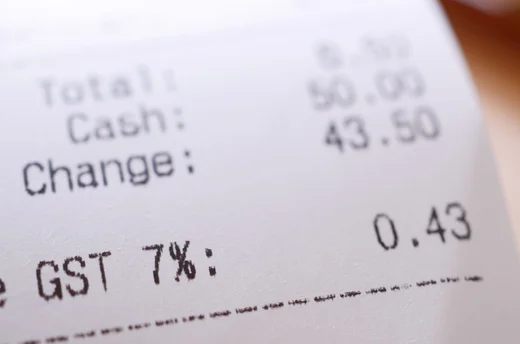
Receipts

Record a cash expense.

Bring the payment details into view so you can check the amount before adding it to an expense claim.

Cash tendered
50.00
Change
43.50
GST (7%)
0.43

What to check Subtract 43.50 in change from the 50.00 tendered to confirm the 6.50 purchase amount.

Printed receipt photographed close up showing 50.00 in cash, 43.50 in change, and 0.43 GST

Bank statements

Reconcile a deposit.

Spend less time copying transaction rows and more time matching what came in and what went out.

Statement period
1–30 Nov 2026
Customer deposit
+$500.00
Closing balance
$1,250.00

What to check Match the $500.00 deposit to your records. The $920.00 opening balance, deposit, and two withdrawals reconcile to $1,250.00.

Riverside Bank
Business checking
Statement
1–30 Nov 2026
Account holder
Westgate Retail
Account ending
•••• 2417
Account activity in USD
DateDescriptionChangeBalance
01 NovOpening balance—$920.00
05 NovCustomer deposit+$500.00$1,420.00
12 NovOffice supplies−$95.00$1,325.00
23 NovCourier service−$75.00$1,250.00
Closing balance
$1,250.00

Bills

See what’s due before you pay.

Bring the billing period, due date, and balance together so you can prepare the next supplier payment.

Billing period
1–30 Nov 2026
Due date
12 Dec 2026
Amount due
$86.40

What to check A $10.00 credit reduces the current charges of $96.40 to $86.40. Check the credit before scheduling payment.

Northline Energy
Electricity service
Utility bill
1–30 Nov 2026
Service account
•••• 0832
Due date
12 Dec 2026
Charges in USD
DescriptionAmount
Electricity usage (310 kWh)$68.20
Service charge$22.00
Tax and fees$6.20
Account credit−$10.00
Amount due
$86.40

Frequently asked questions

Can I try document extraction now?

Document extraction is in development. Join the waitlist for launch and product updates.

What is structured data?

It’s information organized into named fields, such as supplier, amount, and due date. That makes each value easier to check and reuse in a spreadsheet or another workflow.

Is this the same as the Invoice Generator?

The Invoice Generator creates a new invoice from details you enter. Document extraction starts with an invoice, receipt, or statement you already have and reads the information on it.

Need to create a business document today?

NineBrief's free invoice, quote, purchase order and delivery note tools are already available.

Open free tools